Search the catalog:

Need help navigating our website? Search dcls.org >

Author: editor

  • Money Matters with Weiss Financial Ratings

    By: Charissa Roberson, Information Services Assistant

    April is National Financial Literacy Month, making it the perfect time to highlight one of The Library’s free-to-access resources, Weiss Financial Ratings!

    This database provides reliable information on stocks, banks, insurance companies, and more, as well as a variety of tools to help you deepen your understanding and build confidence in the world of finance. Let’s dive in and learn more about what Weiss Financial Ratings has to offer and how it can benefit you.

    Weiss Financial Ratings is divided into three main categories: investments, banking & insurance, and personal finance. We’ll look at each category in turn and go over how to navigate the database to find what you need.

    First, let’s look at investments. This category is divided into stocks, mutual funds, and exchange-traded funds (ETFs). Based on thousands of data points, Weiss Financial Ratings assigns these investments a BUY, HOLD, or SELL rating. A “BUY”- rated investment will have an A or B grade, indicating that Weiss would recommend purchasing shares. A “HOLD” rating with a C grade suggests keeping an eye on this investment if you have it, while a “SELL” rating with a D or E grade means that Weiss would recommend selling your shares.

    These types of ratings are what Weiss calls “investment ratings.” A higher rating means you are more likely to get a good reward with minimal risk, while a lower rating means the return on your investment may not outweigh the risks involved.

    You can begin your search by clicking “Start your search for stocks.” From this page, you can use the Quick Search option if you already know the name or ticker symbol of the stock you’re interested in. If you want to search more broadly, you can browse pre-prepared searches, look for stocks by sector or rating, or build your own search (called a “screener”) with personalized criteria. When you click on a stock, you can view its profile, which includes vital information about the stock, its rating history over the years, and a comparison tool where you can line stocks up side by side and compare their numbers.

    The setup of these search options is the same across the entire database. Click over to mutual funds and ETFs. Notice that, while some terms may be different, the organization and functionality of the pages are the same. The same goes for the pages on banks, credit unions, and insurance companies. Once you get used to using one section of Weiss Financial Ratings, the other sections will start to feel familiar and straightforward to navigate.

    The other type of rating that Weiss provides is “safety ratings.” These apply to banks, credit unions, and insurance companies and follow a letter-grade system (A-E, Excellent to Very Weak). A higher rating means the institution is more likely to remain strong and stable over time, while a lower rating suggests it might not be able to sustain economic difficulties. These ratings can help you determine what institutions to entrust with your hard-earned money.

    Remember, you will find all the same sorts of search tools on these pages as you found under investments. There is a Quick Search tool, an option to build a customized search, and a selection of pre-prepared searches for your convenience. Want to view the profile of a listed bank, credit union, or insurance company? Simply click on the name. Want to compare banks or insurance companies? Use the side-by-side comparison tool.

    Finally, Weiss offers a variety of educational tools to assist you on your personal finance journey. Browse their library of e-Books and learn how to become an investor, how to make and stick to a budget, how to plan for retirement, and much more. These e-Books take complicated subjects and explain them in clear, easy-to-understand language. You can even access consumer guides and printable worksheets to help you plan and organize.

    Whew! We’ve just presented you with a ton of information – so if you’re still feeling uncertain, don’t worry. Weiss Financial Ratings offers FREE webinars on a variety of topics, from how to use the database to tips on shopping for insurance. All you have to do is sign up! Or you can always watch tutorials in their Video Library or type a question in their Chat service.

    This April, take charge of your financial literacy and check out the wealth of resources that Weiss Financial Ratings has to offer!
  • Steppingstones to Milestones

    By: Deborah Megoulas, ESA Youth Services Manager

    What is Steppingstones to Milestones? If you look at the definitions of these terms, you get an idea. One definition of a steppingstone is an action or event that helps one make progress towards a specific goal, and the definition of a milestone is a significant point in development. Steppingstones to Milestones is a series of early learning programs geared toward building early literacy skills in children from birth through 5 years of age.

    How do we reach this goal? We do this by helping parents and caregivers learn ways to better support their children’s learning through the five practices of reading, writing, talking, singing, and playing. Our storytimes exist as a model for parents and caregivers, and we hope they learn something they can take home and use with their families. Engaging in storytimes with their children is one of the easiest things they can do to promote early literacy and language development. To encourage parents to read to their young children, we invite them to participate in 1000 Books Before Kindergarten, a reading incentive program where children receive prize books when they achieve their reading goals.

    The stepping stones in our program include Born to Read, Toddler Storytime, and Preschool Storytime. We also offer an All-Ages storytime that combines elements of each of these.

    Born to Read is for children from birth to 18 months old. The benefits of reading to babies are great. The younger you begin reading to a child, the more beneficial it is for their early language and literacy development.

    Toddler Storytime is for children aged 18-35 months. This program builds on the language and literacy development of Born to Read by adding age-appropriate activities to support the development of vocabulary, phonological awareness, and print awareness.

    Preschool Storytime is for children 3 to 5 years old. Preschool Storytimes continue to build on those early literacy skills with growing awareness of print motivation, letter knowledge, and narrative skills.

    To learn more about our program schedule, please visit one of the libraries or www.dcls.org for a copy of Compass. We are excited to announce that we are expanding our storytime options with an All- Ages Storytime at the Madeline L. Olewine Memorial Library beginning Wednesday, April 1, 2026.

    If you can’t make one of our storytimes, check out our Steppingstones to Milestones Newsletter for ideas and activities you can do at home to support your child’s early literacy development.

  • Introducing the Salem Online Collection at The Library

    By: Ann Marie, Information Services Supervisor

    Have you ever been researching a topic and wished you had instant access to a reliable reference book? Salem Online makes that possible.

    Salem Online is a powerful research database that offers digital access to a broad selection of trusted reference materials published by Salem Press, and its partner Grey House Publishing. These materials feature a wide range of topics, including literature, history, health, science, careers, and business.

    Salem Press has a long-standing reputation for providing schools, universities, and libraries with authoritative, well-researched books. Many of these titles have long been included in the Dauphin County Library System’s reference collection, and for decades, adults looking for reliable medical information, job seekers exploring new career paths, or students conducting research for a project have turned to our reference copies of Salem Press volumes to provide them with accurate information.

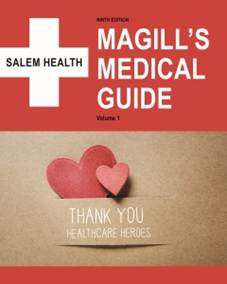
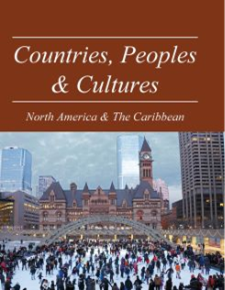
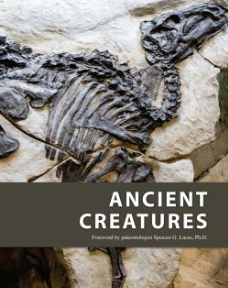
    Pictured below are three examples of Salem Press titles that have been serving the community well:

    To view our full collection of more than 160 print titles, perform a basic search of our catalog using the search term “Salem Press.”  As you browse through the results, you can see the library location where each volume is located. (Here is a link showing that list sorted alphabetically.) 

    Reference Books You Can Access Anywhere

    In recent years, through its Salem Online database, Salem Press began offering library users a way to access the full-text content of these print reference books remotely anytime of the day or night, and by adding this resource to our collection, The Library has widely broadened access to these reference materials. Now, members from all library locations can view the content of these books online without needing to make a trip to a specific library; and, because this database also permits users to download and save content, they no longer need to pay to make photocopies from reference books that do not check out, either.  All content found in this database is identical to what is offered in the print volumes, so users can feel confident about using the online versions for their research.

    How to Access Salem Online

    Ready to give Salem Online a try for yourself? You will be happy to learn that Salem Online is easy to navigate, and access is free for library members. To find Salem Online, visit The Library’s homepage and select “Research.” Then scroll down through the alphabetic list of databases until you find “Salem Online.”  To open this resource, either click on the “USE RESOURCE” link under the database description or click on the “Salem Online” title itself. If you are outside of a library building, enter your library card number and PIN when prompted. Once you do, the resource will open.

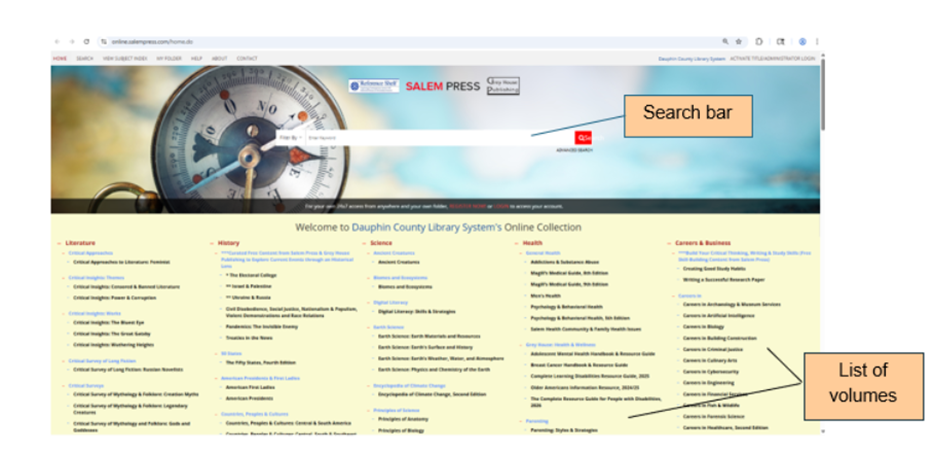
    When it does, you will see a search bar – along with an advanced search option – near the top of the landing-page screen. You will also see a browsable list of titles organized by category in the bottom half of the screen. You can enter a keyword search term (or title) for a more direct search, or you can browse through the titles and explore their tables of contents and indexes to search for wanted content. The image below shows what the landing-page looks like.

    For a quick demonstration on how to use this resource, view this video: 
    https://salempress.com/online-intro-video.  

    Helpful Tools for Researchers

    As you begin to explore this incredibly useful resource for yourself, be sure to look for the many tools that make using Salem Online even more beneficial to use. These tools include ones to: 

    • Switch to a dyslexic-friendly font 
    • View three citation types for each article. 
    • Save the article. 
    • Print the article. 
    • Email the article. 
    • Copy a Permalink of the entry. 
    • Search using specific keywords (which will be highlighted in the text).
    • Modify font size by adjusting your computer’s magnification level. 

    Access Salem Titles Directly from the Catalog

    There is another convenient way to find and access Salem Press content online.

    When you locate a Salem Press title in the library catalog, you can navigate directly to the online version of the book. Look for the “Edition Information” link at the bottom of the record and click it. If the book offers an online version, you will see an “Also available online” link on the next page. When you click that link, the online version from the database will automatically open.

    [Note: If you are outside of a library building when you click the “Also available online” link, you be asked to enter your library card number and PIN to view the online resource.]

    Try It Today

    With a little practice, you will very quickly become well-versed in using Salem Online for your research. If you would like help exploring Salem Online, stop by the East Shore Area Library. The Information Services team will be glad to walk you through this resource and help you get started.